Sponsored

Dash Cam Hardwiring to Mirror and Rear Cam Install

Dan in Austin

Member
First Name
Dan
Joined
Sep 23, 2025
Threads
1
Messages
10
Reaction score
20
Location
Austin, TX
Car(s)
2025 Z Performance
Does anyone have a video or detailed instructions showing how to get to the rear view mirror power source? I'm looking to connect a dash cam to it with one of those power adapters (also looking for suggestions of adapters). I'm afraid of messing with trim since that time 40 years ago when my dad and I replaced the speakers in his 1977 Toyota Corolla wagon and broke a lot of clips in the door panels : ) I'm also pretty good at breaking clips when I try and do anything under the hood, which is seldom and usually a bad idea. So, if you've got very detailed info/video for someone who is inexperienced, I'd sure appreciate it if you would share with me.

Even better if you have similar video/info about how to get all the way to the rear windshield - my dash cam has a rear camera, but I can't imagine how to hide the wire all the way to the back and onto the hatch.

Thanks,
Dan
 

Bungle

Member
First Name
Anthony
Joined
Apr 3, 2025
Threads
1
Messages
18
Reaction score
21
Location
Arlington, TN
Car(s)
2024 Nissan Z Sport
Occupation
Retired!
I opted to use a dongle to tap into the auto dimming power in the rear view mirror. No need to remove mirror, trim or headliner.
 

C89

Active Member
Joined
Apr 30, 2025
Threads
0
Messages
44
Reaction score
32
Location
Melbourne
Car(s)
Nismo Z, R34
Try this, should be a plug and play option:

https://dongar.tech/products/dca-10a

Unplug the cable on the back of your mirror, plug this adapter in, re-plug your OEM mirror cable to the back of the adapter, now you have a USB-C slot for your dash cam.

For the rear camera, you could just tuck wiring inside the roof liner.
 
OP
OP
Dan in Austin

Dan in Austin

Member
First Name
Dan
Joined
Sep 23, 2025
Threads
1
Messages
10
Reaction score
20
Location
Austin, TX
Car(s)
2025 Z Performance
Thanks for the replies, but I think you've overestimated me!!!

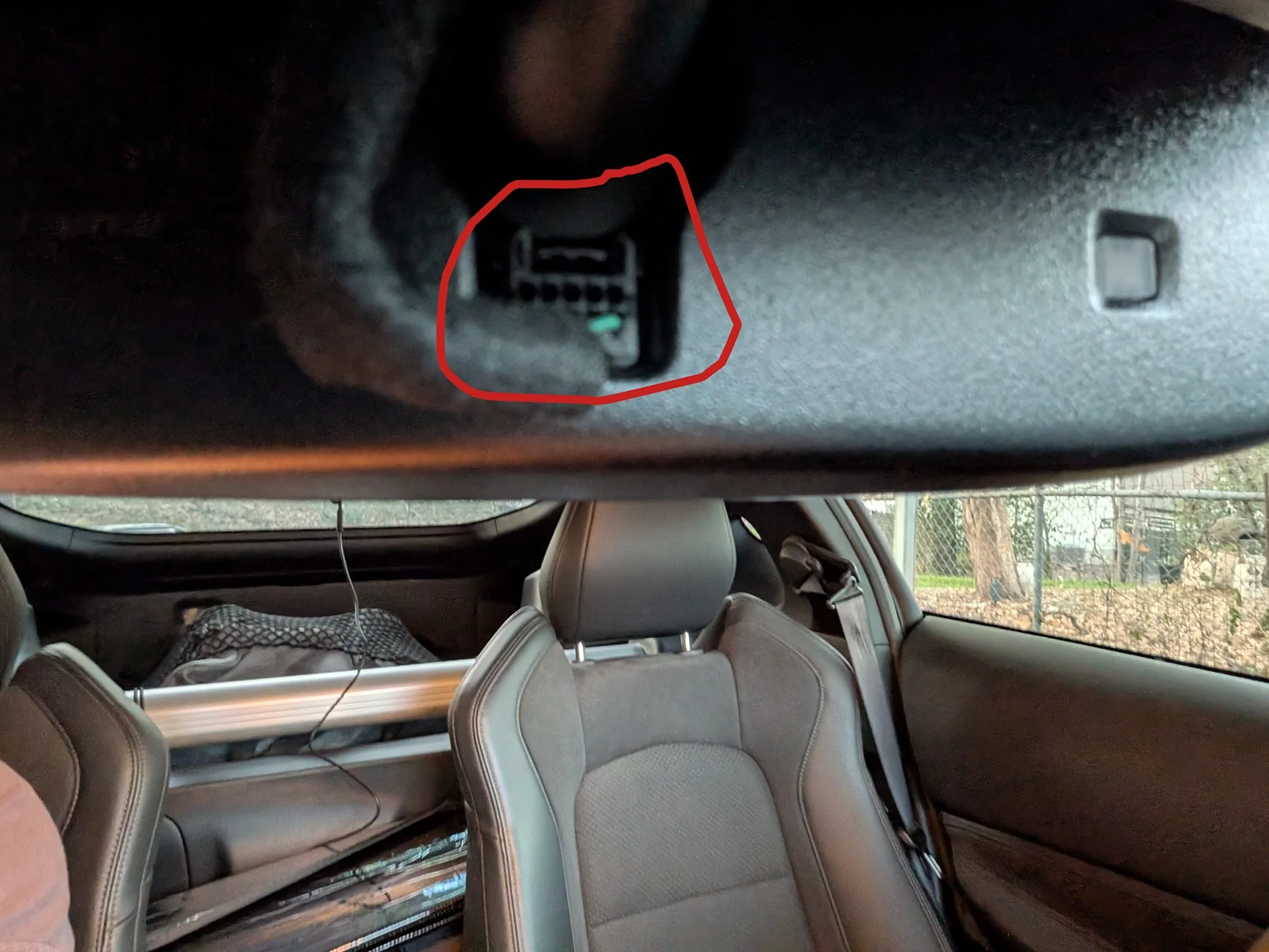
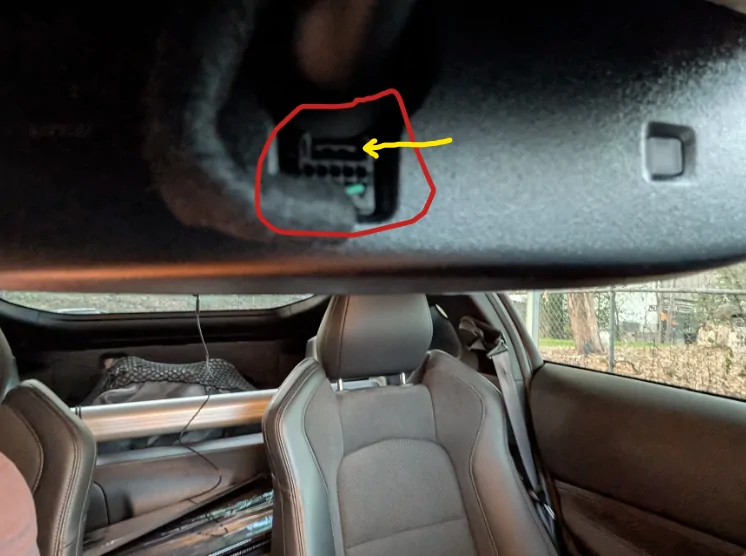
I was planning to use that Dongar device based on other threads here. Is there literally an exposed plug in the front-facing part of the mirror housing that I just can't see from inside? I had assumed that you need to remove a cover or housing or something at the base of the to get access to the port/plug. Now that I looked with my phone, I can see this plug back there. I thought other folks talked about hiding extra wiring under the cover, so I'm still curious about how to get that off.

PXL_20251228_232606337.webp


When you say "you could just tuck wiring inside the roof liner," you are mistaken - that is not a skill that I possess. ;) Is there a specific tool that I should buy and just use that tool to poke the cable and it magically disappears between the plastic trim and the headliner?
That's why I was hoping that someone had videos - I'm just not good at understanding without a clear visual, and I have zero experience.
 

KrackaC8

Well-Known Member
First Name
Christopher
Joined
Nov 23, 2025
Threads
8
Messages
972
Reaction score
1,314
Location
Fulshear, TX
Car(s)
2023 Z Performance, 2024 Grand Cherokee, 2023 Wrangler Rubicon
Occupation
VP
Thanks for the replies, but I think you've overestimated me!!!

I was planning to use that Dongar device based on other threads here. Is there literally an exposed plug in the front-facing part of the mirror housing that I just can't see from inside? I had assumed that you need to remove a cover or housing or something at the base of the to get access to the port/plug. Now that I looked with my phone, I can see this plug back there. I thought other folks talked about hiding extra wiring under the cover, so I'm still curious about how to get that off.

PXL_20251228_232606337.webp


When you say "you could just tuck wiring inside the roof liner," you are mistaken - that is not a skill that I possess. ;) Is there a specific tool that I should buy and just use that tool to poke the cable and it magically disappears between the plastic trim and the headliner?
That's why I was hoping that someone had videos - I'm just not good at understanding without a clear visual, and I have zero experience.
https://www.harborfreight.com/trim-and-molding-tool-set-5-piece-64126.html

Pop the plastic off the inside of the windshield around the mirror surround and you'll have access to power and the ability to hide the wires. Very very easy; pry gently and it will come right off. I had to remove mine to swap rearview mirrors.

Here's a good video that shows you how:
 

C89

Active Member
Joined
Apr 30, 2025
Threads
0
Messages
44
Reaction score
32
Location
Melbourne
Car(s)
Nismo Z, R34
Our mirrors/plugs are different in Australia, but from what I can see, I think you just squeeze down on that horizontal tab (highlighted with yellow arrow), and pull the plug outwards.

1766965546081-ls.webp


https://dongar.tech/cdn/shop/videos...5f514da5243.HD-1080p-2.5Mbps-26123062.mp4?v=0

The above link is a video from the Dongar website.

And the video below isn't on a Z, but should give you a rough idea on how to tuck the cable to the rear dash cam:


chadgigachad

Well-Known Member
Joined
Mar 16, 2025
Threads
2
Messages
166
Reaction score
123
Location
Texas
Car(s)
Stealth Grey 24 Nissan Z Nismo
Try this, should be a plug and play option:

https://dongar.tech/products/dca-10a

Unplug the cable on the back of your mirror, plug this adapter in, re-plug your OEM mirror cable to the back of the adapter, now you have a USB-C slot for your dash cam.

For the rear camera, you could just tuck wiring inside the roof liner.
I used this with a knockoff blendmount and a usb -> uniden RJ11 adapter to set up my Uniden R7. Works great and way easier then using wire taps.
 
OP
OP
Dan in Austin

Dan in Austin

Member
First Name
Dan
Joined
Sep 23, 2025
Threads
1
Messages
10
Reaction score
20
Location
Austin, TX
Car(s)
2025 Z Performance
https://www.harborfreight.com/trim-and-molding-tool-set-5-piece-64126.html

Pop the plastic off the inside of the windshield around the mirror surround and you'll have access to power and the ability to hide the wires. Very very easy; pry gently and it will come right off. I had to remove mine to swap rearview mirrors.

Here's a good video that shows you how:
Thanks for the video and instruction/endorsement of the ease - that's helpful and gives me the confidence to mess with it!!! The dash cam I bought came with one tool, but I'll run out to Harbor Freight today and grab the set you linked to.
 
OP
OP
Dan in Austin

Dan in Austin

Member
First Name
Dan
Joined
Sep 23, 2025
Threads
1
Messages
10
Reaction score
20
Location
Austin, TX
Car(s)
2025 Z Performance
Our mirrors/plugs are different in Australia, but from what I can see, I think you just squeeze down on that horizontal tab (highlighted with yellow arrow), and pull the plug outwards.

1766965546081-ls.webp


https://dongar.tech/cdn/shop/videos...5f514da5243.HD-1080p-2.5Mbps-26123062.mp4?v=0

The above link is a video from the Dongar website.

And the video below isn't on a Z, but should give you a rough idea on how to tuck the cable to the rear dash cam:


Both those videos were super helpful to me. Looks like the wire hiding thing really isn't that bad. And thanks for the pointer about the tab on the wiring harness. It's so hard to see anything inside this tiny little car...
 

xyzdx

Member
First Name
Trent
Joined
Nov 27, 2025
Threads
5
Messages
16
Reaction score
13
Location
Sacramento, CA
Car(s)
Buying one in Jan. Currently own 2 tacomas
Occupation
Business owner
What's the best dash cam to get that doesn't block the window much?
 

Midz10

Well-Known Member
Joined
May 30, 2025
Threads
1
Messages
86
Reaction score
81
Location
Saudi Arabia
Car(s)
2023 Z, 2008 2JZ 350Z, 2006 EVO9, 2002 Pathfinder,
1661111168779 (1).webp
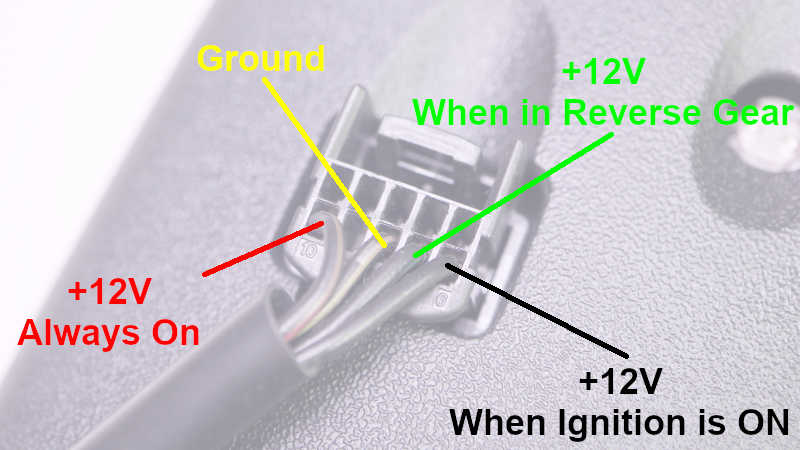
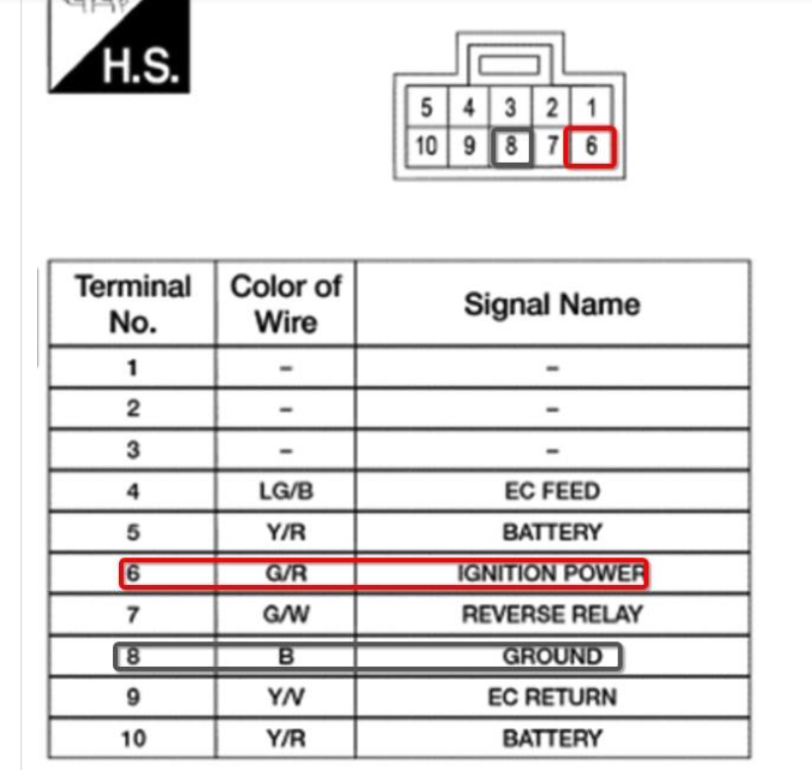
mazda-homelink-dimming-mirror-pinout.jpg


Pinout for Nissan10 pin rear view dimmer connecter. Double check with a voltmeter or an LED light.


Top