
Sponsored

Since my dealer charged me 230$ to disable the ASE, I will do it myself

Dying Star

Well-Known Member
Joined
Jul 1, 2025
Threads
3
Messages
133
Reaction score
95
Location
texas
Car(s)
Nissan Z
I wanted to turn off hill start assist, but searching through the settings, I couldn't find a way to turn it off.

I'd also love it if I could change ICC and regular cruise control such that regular is short press and ICC was long press.
That’s a bad idea imho 😮 I live close to hills and my hand brake’s starting to slip, hill start assist is a god send on “stock” tires 😭
 

Kimbonits

Member
Joined
Nov 3, 2025
Threads
0
Messages
11
Reaction score
13
Location
New Mexico
Car(s)
2024 RZ34 Performance MT, 1984 Z31 Coupe Turbo MT
Occupation
Engineer
I went the VXDiag route. $135 for the OBD2 dongle (Xmas special – arrived in 7 days from China no problem) and used their link to VXDiag’s download page for an “evaluation” copy of the Consult III+ software. Had a dedicated Win10 laptop with all antivirus measures turned off. Follow the install directions closely, plugged it into the OBD2 port and with ignition on and after some digging found the audio amp setting and the page to make changes. The Consult III+ software is NOT intuitive, but after some digging I turned-off both ASE/C and ANC. I did not go playing around with anything else, I just wanted the fake noise and active noise cancellation turned off due to a recent powered sub install (Cerwin Vega) that both systems interfered with. As per everyone, this is something that should have been selectable from the get-go. I mainly went the dongle route so that I had the ability in the future to revisit these settings (unlikely) and when modding for anything else that needs it. I did ping a local dealership just to find out what it would cost me and unsurprisingly never heard back from them. Having ANC and ASE/C tuned off was necessary for my audio setup and I never liked the idea of actually being inside a pair of Bose noise cancelling headphones. Made a huge difference in drivability particularly in being able to hear the car’s response more clearly/directly. No noticeable changes in cabin noise with the ANC turned off at any speed but it’s a sports car for sh*t sake. If you want it quiet, go buy a Lexus. I also have sport mode turned off, and rev match the old way. FYI, the ANC and ASE/C do not turn off when NOT in sport mode as some info on the web leads you to believe. $135 and some dicking around but worth it. Should never have had to do this but there you go. Nissan prides itself on knowing what real drivers want and then they go invest effort into this farkle.
 
Last edited:

mitchyboy

New Member
First Name
Mitch
Joined
Nov 24, 2024
Threads
0
Messages
3
Reaction score
0
Location
Adelaide, Australia
Car(s)
24 Nismo Z
I went the VXDiag route. $135 for the OBD2 dongle (Xmas special – arrived in 7 days from China no problem) and used their link to VXDiag’s download page for an “evaluation” copy of the Consult III+ software. Had a dedicated Win10 laptop with all antivirus measures turned off. Follow the install directions closely, plugged it into the OBD2 port and with ignition on and after some digging found the audio amp setting and the page to make changes. The Consult III+ software is NOT intuitive, but after some digging I turned-off both ASE/C and ANC. I did not go playing around with anything else, I just wanted the fake noise and active noise cancellation turned off due to a recent powered sub install (Cerwin Vega) that both systems interfered with. As per everyone, this is something that should have been selectable from the get-go. I mainly went the dongle route so that I had the ability in the future to revisit these settings (unlikely) and when modding for anything else that needs it. I did ping a local dealership just to find out what it would cost me and unsurprisingly never heard back from them. Having ANC and ASE/C tuned off was necessary for my audio setup and I never liked the idea of actually being inside a pair of Bose noise cancelling headphones. Made a huge difference in drivability particularly in being able to hear the car’s response more clearly/directly. No noticeable changes in cabin noise with the ANC turned off at any speed but it’s a sports car for sh*t sake. If you want it quiet, go buy a Lexus. I also have sport mode turned off, and rev match the old way. FYI, the ANC and ASE/C do not turn off when NOT in sport mode as some info on the web leads you to believe. $135 and some dicking around but worth it. Should never have had to do this but there you go. Nissan prides itself on knowing what real drivers want and then they go invest effort into this farkle.
Just checking - did you also need to purchase the days subscription from Nissan, or did it work with just the VXDiag dongle and software link?

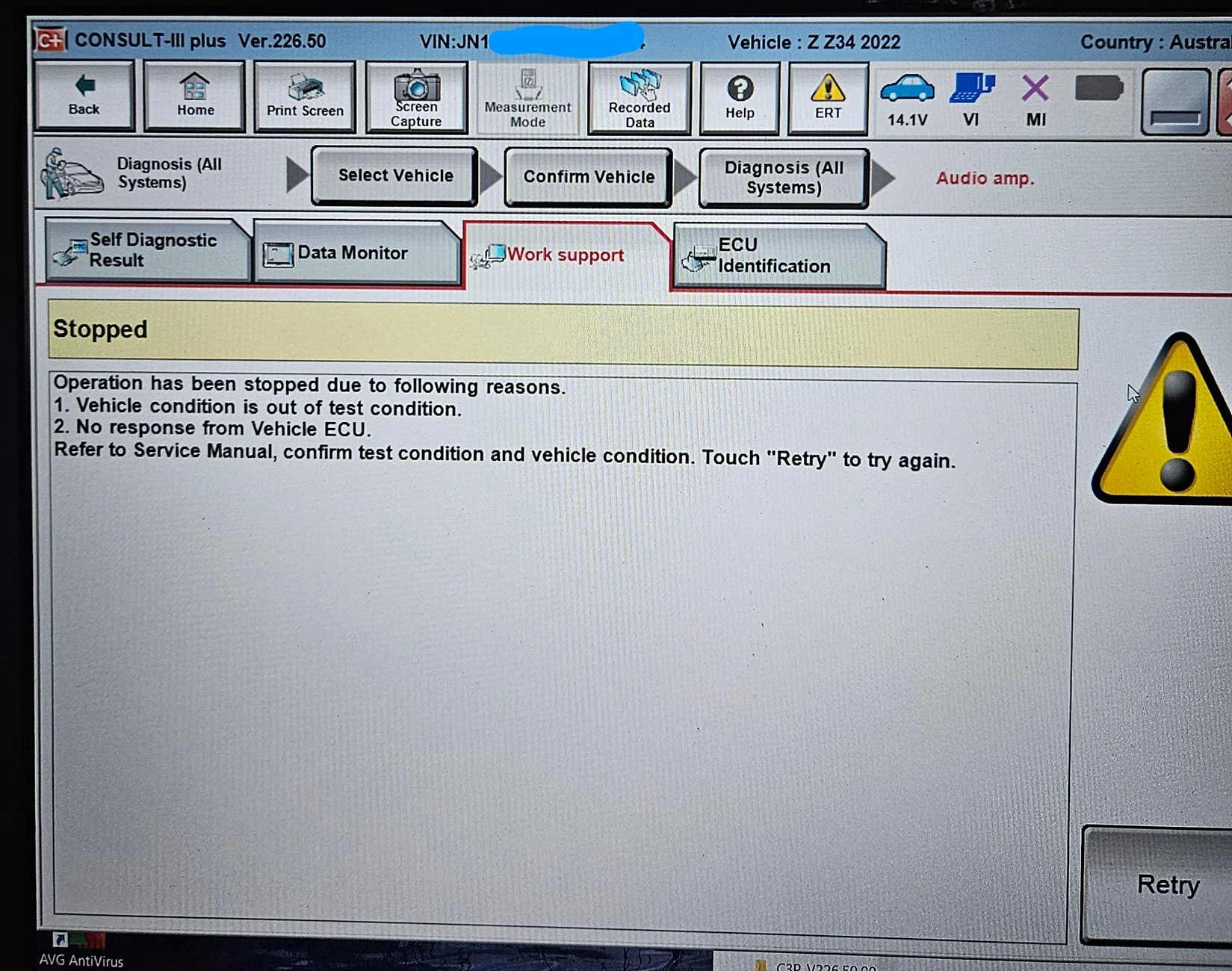
I've got the VXC Nano and tried Consult 3 versions 226 and 241, and haven't had any luck with either. I can get to the ASE and ANC screens but when I press the off button I get an error...

20260129_175748.webp
 

Kimbonits

Member
Joined
Nov 3, 2025
Threads
0
Messages
11
Reaction score
13
Location
New Mexico
Car(s)
2024 RZ34 Performance MT, 1984 Z31 Coupe Turbo MT
Occupation
Engineer
Just checking - did you also need to purchase the days subscription from Nissan, or did it work with just the VXDiag dongle and software link?

I've got the VXC Nano and tried Consult 3 versions 226 and 241, and haven't had any luck with either. I can get to the ASE and ANC screens but when I press the off button I get an error...

20260129_175748.webp
 

Kimbonits

Member
Joined
Nov 3, 2025
Threads
0
Messages
11
Reaction score
13
Location
New Mexico
Car(s)
2024 RZ34 Performance MT, 1984 Z31 Coupe Turbo MT
Occupation
Engineer
G'day mate,

No need to purchase anything from Nissan. The DxDiag folk send you a link to their download page so you can install their "evaluation" copy of Consult III+. BUT it looks like you did that. Connectivity to the ECU is finicky. Make sure the car ignition is on. I actually ran my car to make sure (engine on) with the dongle in and then restarted all the software. It did find it eventually (you need to make sure you do NOT get the ECU connect error message that you have in your screenshot) and got a response from the ECU. Then turn them both off and make sure to go back out and back in to make sure the changes have been saved. It is not obvious (you do not get a verification/save prompt) that changes are made after you select "off".

I was born and bred in Adelaide. Go CROWS!
 

RadzShadow

Well-Known Member
First Name
Rob
Joined
May 17, 2025
Threads
6
Messages
237
Reaction score
234
Location
New Mexico
Car(s)
2024 Nissan Z Performance, 1998 Chevy Silverado K1500, 2015 POS Chrysler 200C
Occupation
ISSE
I FINALLY took care of the these settings this morning. The difference was immidiately obvious even just sitting in the garage. I can now hear the real exhaust minus the ASE and it sounds like a sports car should. The ANC being off, GREATLY improved the BOSE sound system.
I procrastinated way, way too long on turning these off.
 

KrackaC8

Well-Known Member
First Name
Christopher
Joined
Nov 23, 2025
Threads
8
Messages
971
Reaction score
1,313
Location
Fulshear, TX
Car(s)
2023 Z Performance, 2024 Grand Cherokee, 2023 Wrangler Rubicon
Occupation
VP
I'm going in to the dealership in about two weeks to handle 2 open recalls and I've asked them to disable ASE while they're at it (I want to leave ANC enabled for highway cruise tire/road noise).
 

trackratZ

Well-Known Member
First Name
August
Joined
Mar 23, 2021
Threads
95
Messages
2,837
Reaction score
5,362
Location
So CA
Car(s)
25 Z Perf 6MT, Cayman S (track), Tesla Model Y, Gladiator, MX5 Club (autox)
Occupation
Software security
I FINALLY took care of the these settings this morning. The difference was immidiately obvious even just sitting in the garage. I can now hear the real exhaust minus the ASE and it sounds like a sports car should. The ANC being off, GREATLY improved the BOSE sound system.
I procrastinated way, way too long on turning these off.
Was this done by yourself or dealer service? I'd rather have the dealer disable just my ASE on my next visit, don't like dealing with ECU settings while still in warranty. If anything goes wrong it's on the dealer's hands.
 

RadzShadow

Well-Known Member
First Name
Rob
Joined
May 17, 2025
Threads
6
Messages
237
Reaction score
234
Location
New Mexico
Car(s)
2024 Nissan Z Performance, 1998 Chevy Silverado K1500, 2015 POS Chrysler 200C
Occupation
ISSE
I did it myself, it really isn't touching the ECU for the most part, just changing two parameters. It was instant once I checked the OFF button, so I don't think it is writing back to the ECU that quickly.
 

trackratZ

Well-Known Member
First Name
August
Joined
Mar 23, 2021
Threads
95
Messages
2,837
Reaction score
5,362
Location
So CA
Car(s)
25 Z Perf 6MT, Cayman S (track), Tesla Model Y, Gladiator, MX5 Club (autox)
Occupation
Software security
I did it myself, it really isn't touching the ECU for the most part, just changing two parameters. It was instant once I checked the OFF button, so I don't think it is writing back to the ECU that quickly.
Good to know it's that simple, thank you! You used the Consult III?
 

RadzShadow

Well-Known Member
First Name
Rob
Joined
May 17, 2025
Threads
6
Messages
237
Reaction score
234
Location
New Mexico
Car(s)
2024 Nissan Z Performance, 1998 Chevy Silverado K1500, 2015 POS Chrysler 200C
Occupation
ISSE
Yes and I did have to buy the 'day pass' through nissan-techinfo.com
 

Apex_Z

Well-Known Member
First Name
Rob
Joined
Aug 28, 2025
Threads
3
Messages
111
Reaction score
188
Location
North Orlando
Car(s)
2025 Z Performance, 1950 Chevy Styleline, 1920's ratrod
Occupation
Engineer
I went the VXDiag route. $135 for the OBD2 dongle (Xmas special – arrived in 7 days from China no problem) and used their link to VXDiag’s download page for an “evaluation” copy of the Consult III+ software. Had a dedicated Win10 laptop with all antivirus measures turned off. Follow the install directions closely, plugged it into the OBD2 port and with ignition on and after some digging found the audio amp setting and the page to make changes. The Consult III+ software is NOT intuitive, but after some digging I turned-off both ASE/C and ANC. I did not go playing around with anything else, I just wanted the fake noise and active noise cancellation turned off due to a recent powered sub install (Cerwin Vega) that both systems interfered with. As per everyone, this is something that should have been selectable from the get-go. I mainly went the dongle route so that I had the ability in the future to revisit these settings (unlikely) and when modding for anything else that needs it. I did ping a local dealership just to find out what it would cost me and unsurprisingly never heard back from them. Having ANC and ASE/C tuned off was necessary for my audio setup and I never liked the idea of actually being inside a pair of Bose noise cancelling headphones. Made a huge difference in drivability particularly in being able to hear the car’s response more clearly/directly. No noticeable changes in cabin noise with the ANC turned off at any speed but it’s a sports car for sh*t sake. If you want it quiet, go buy a Lexus. I also have sport mode turned off, and rev match the old way. FYI, the ANC and ASE/C do not turn off when NOT in sport mode as some info on the web leads you to believe. $135 and some dicking around but worth it. Should never have had to do this but there you go. Nissan prides itself on knowing what real drivers want and then they go invest effort into this farkle.
Same experience
 

KrackaC8

Well-Known Member
First Name
Christopher
Joined
Nov 23, 2025
Threads
8
Messages
971
Reaction score
1,313
Location
Fulshear, TX
Car(s)
2023 Z Performance, 2024 Grand Cherokee, 2023 Wrangler Rubicon
Occupation
VP
I'm going in to the dealership in about two weeks to handle 2 open recalls and I've asked them to disable ASE while they're at it (I want to leave ANC enabled for highway cruise tire/road noise).
DONE! ✔

No charge.
 

Killjoy_Z

New Member
First Name
Brian
Joined
Dec 30, 2025
Threads
1
Messages
4
Reaction score
6
Location
Texas
Car(s)
2024 Nissan Z Performance
Okay, I just finished turning off ASE/ASC and ANC using the VXDIAG method. I just wanted to stop in here and give a run down of everything I did to make it as clear as possible, because I put myself in pain by fiddling in the wrong directions.

So, first off, I got the SE version - the VXDIAG VCX SE for Nissan - though you can save money by getting the VCX Nano, but you will be limited to connecting wirelessly, where as the SE comes with USB and Ethernet connecting options, which makes things easier and you won't have to worry as much about dropping connection or wondering if things are connected in the first place. SE costed me $210 bucks with a 20% off discount code (I won't bother posting it because it may not be applicable by the time you are reading this. It does seem to be one of those products that is perpetually on some sort of holiday sale.) It probably cost about the same as a visit to the dealership, but is worth it to me for not having to deal with said dealership and also for any future use cases.

With that out of the way, the first thing you need to do is hurry up and DO NOTHING. When you first get your product in the mail, you're going to want to get the VX software and get going, but you need to immediately calm down and do nothing. Instead you need to send VXDIAG an email requesting download links to the Nissan's Consult III software.


Send an email to:
[email protected]
Say the following:

I need the download link for Nissan Consult III Plus for my VCX SE scanner.

My order number is:
#YOURORDERNUMBERHERE


They replied to me later in the day with links to a PDF that had a walkthrough on how to download the Consult III package. If installed correctly this will not require any logins, only the hardware and the software provided.

On a laptop with Windows 10 (it may work on other Windows (7, 8, 11), but it is suggested that you use Windows 10).

In the download you will have a number of files and folders, including a video and a text guide into how to install VX Manager and Consult III correctly. PLEASE follow these steps exactly. If you don't, Consult will not be able to recognize the VX device and you will have wasted your time. If you mess this up, it isn't the end of the world, I will include some fixes to problems you might run into at the end of this post.

Note: You are going to probably want to be inside with the good connection for the first few parts of the installation. Mostly because there are two specific files that are going to give you a warning message on your laptop if you aren't plugged into a power source. Maybe its because the laptop I borrowed was old and had to use a 120W plug to charge instead of your typical USB-C, this may not be a problem for you but it was for me. Then one of the steps will tell you to plug in your device and thats when you head to the car.

Also, just turn the car on fully, just to make sure your systems are always going to be on and don't have a chance to time out and turn off again. Idk if this happens in the Z, but it is common in other vehicles (my GR86) when in "Accessory Mode".


Once you've installed everything as instructed in the provided text instructions (the video is also very helpful if you are like me and are more of a visual learner) you will likely now be inside of the Consult III software. Once you are in there and have everything connected you will need to navigate through Consult using the following path:

1. Diagnosis (One System)
- It was either at this point or just before that you will be asked to identify your make and model. Since you are not logged into a Nissan network, you can't use the automatic ID using your VIN, so you will just need to find the Z, select it, and select the correct year. You may need to give it a second before the Select button is active, if it never becomes active to click then you may need to select something else and then reselect the Z and the proper year (2023MY or 2024MY).
2. Audio Amp
- This was on page 3 for me, just navigate the listed systems until you find it. Once you select it, it will contact your car. It will look like its not doing anything and sill stay at 0% for a while. Eventually it will either A. Successfully connect to the vehicles computer or B. Fail - if it fails check the bottom of this post for a fix.
3. Work Support (tab)
- In the work support tab you will find the ASC and ANC settings, you are now in the promised land, brothers. Select ANC, head into the menu, turn it off, confirm, head back. Go to ASC, rinse and repeat, leave.
4. Double Check Your Work!
At this point I left the entire Consult III software, unplugged and replugged VXDIAG device, and went BACK in and checked the settings again - they remained off, and victory was achieved.

Problems & Fixes
As I am a (lovable) dumbass and often get ahead of myself, I did run into a few problems that maybe you too have run into. I hope these fix your issues!

1. "When I am in Consult III and try to use the VI/MI scan, nothing shows up!"
-This is likely because you installed it wrong/out of order/or something just went wrong during the process and you need to try again. You will now need to uninstall everything and retry. Go into your add/remove programs in Windows and uninstall everything to do with Bosch, there will be like 3 or 4 things listed, get rid of them all. Uninstall anything about VX and VX Manager and uninstall anything to do with Contact III.
-Once you've gotten rid of that, use the windows search to go into Reg Edit to open the system's registry editor. Once you're in the Registry Editor window select Computer at the top of the navigator and then click on Edit at the top and select Find - I just typed Nissan and it showed the Consult registries. Right click and delete anything in there associated with Consult. Now start over and be meticulous about following those installation instructions VX give you! If any of this confuses you and you need references, check out the video that VX includes in the folder with all of the installation stuff and you can see what it looks like for a successful connection to be found with your VXDIAG device in Consult.


2. "I selected Audio Amp but failed to connect to the vehicle!"
- I fixed this problem by first by backing out of Consult, quitting the program. I then turned off the car and unplugged the VXDIAG device. After a few seconds I started the car back up, plugged the device back in, and re-launched Consult III. When I tried to get into the system this time, it worked perfectly. My guess is if there is a lot of sitting around the connection can time out in the background, but I'm just talking crap.

If you have any questions feel free to DM me, I'm not a professional, in fact I don't know anything about nothin', but I'll try my best to help if I can.

I know a lot of this is covered by some of the heroes in this post. The pioneers. The legends. So full credit and love goes to all involved in this thread, but especially @Kimbonits for the building blocks of my success and to @CasualSpec for the pictures that helped me navigate the dangers on this journey. 🤝
 

David Montgomery

Well-Known Member
First Name
David
Joined
Mar 17, 2025
Threads
5
Messages
59
Reaction score
59
Location
New Hampshire
Car(s)
2024 RZ34 Performance 6MT, 1981 S130 Turbo 5MT
Can I ask, why do people want to disconnect the ASE anyway? Does it cause issues with the stereo system? I have a 2019 Titan that has a noise from the filler pipe when you fill up the truck. Everybody when back to the dealer to get it fixed. The funny thing is, it was a audible indicator. As the tank would fill the pitch of the noise will change as the tank fills up. For some reason that bothered people similar to the ASE. Maybe I am just old, but the ASE seems perfectly harmless, but I could be wrong. Can someone explain to me the detractors of this system?


Top